Microsoft has announced initial steps to improve the quality of Windows 11 in the coming year.
In a blog post, Microsoft Windows + Devices EVP Pavan Davuluri outlined several changes, including:
- More taskbar customization, including vertical and top positions;
- Integrating AI where it’s most meaningful, with craft and focus;
- Faster and more dependable File Explorer;
- More control over widgets and feed experiences;
- A simpler, more transparent Windows Insider Program; and
- An improved Feedback Hub.
Davuluri explained that the changes will be previewed in Windows Insider builds during March and April.
Building on those updates, Microsoft plans to raise the bar on Windows 11 quality in the coming year, he noted.
“The work is underway,” he wrote. “You can expect to see tangible progress that you’ll be able to feel as you preview builds from us throughout the rest of the year.”
Windows 11 Performance Issues Persist
Despite Microsoft’s optimistic outlook for Windows 11 in the coming year, the facts about the operating system are stark, contended Mark N. Vena, president and principal analyst of SmartTech Research, a technology advisory firm in Las Vegas.
“Windows has let too much friction pile up in plain sight — sluggish File Explorer behavior, bloated background activity, memory pressure on mainstream PCs, and a general sense that the OS too often gets in the user’s way instead of helping them work,” he told TechNewsWorld.
“Microsoft’s new quality push explicitly targets performance, reliability, and responsiveness, which is basically an acknowledgment that too many users have been tolerating death by a thousand cuts,” he said.
“Microsoft needs Windows 11 to look less like a compromise and more like an upgrade,” he added, “especially as buyers weigh whether to refresh aging hardware.”
“At the same time,” he continued, “AI PCs, tighter enterprise budgets and stronger expectations around battery life, efficiency and responsiveness are pushing Microsoft to prove Windows can feel leaner on everyday devices, not just smarter in demos.”
Struggles on Budget PCs
Windows 11 has been disappointing to some consumers, especially budget PC buyers, observed Ross Rubin, the principal analyst with Reticle Research, a consumer technology advisory firm in New York City.
“We’re in the post-Windows 10 era, and Windows 11 simply has more demanding system requirements,” he told TechNewsWorld. “People who are migrating may find that if they are purchasing lower-end devices, they are not seeing the level of performance that they would have expected from a new machine.”
More people will be buying budget machines due to the RAM crunch. “Because RAM is a supply-constrained market, prices have been going up, so people are inclined to buy lower-spec machines,” he said. “Microsoft wants those consumers to have as good an experience on those PCs as they can.”
“RAM efficiency has gone from being a background engineering issue to a front-line user experience issue, especially on the huge installed base of eight-gigabyte and 16-gigabyte machines,” Vena explained.
“Microsoft’s latest messaging specifically calls out lower resource use and better responsiveness under heavier load, which tells me the company knows users are now judging Windows by how much headroom it leaves them, not by how many features it can preload,” he said. “In the AI PC era, wasting memory is not just sloppy, it steals performance from the very workloads Microsoft wants people to adopt.”
Microsoft has treated Windows as a cash cow for a long time, added Rob Enderle, president and principal analyst of the Enderle Group, an advisory services firm in Bend, Ore. “The end result is there’s been a lot of push to move people to some of the newer iterations of Linux that are more consumer-focused,” he told TechNewsWorld. “Some of the OEMs have been aggressively making that push.”
“Windows is expensive and has become kind of bloated and disappointing for a lot of folks,” he said. “For a lot of people, Linux actually does the job better.”
Rethinking Copilot
Another reason Windows 11 needs quality improvements is that Microsoft’s AI offering, Copilot, really hasn’t been a success, Enderle contended. “By almost any measure, it’s been a failure on Windows, and so they really have to rethink it.”
That’s what Microsoft will be doing this year. “You will see us be more intentional about how and where Copilot integrates across Windows, focusing on experiences that are genuinely useful and well-crafted,” Davuluri wrote. “As part of this, we are reducing unnecessary Copilot entry points, starting with apps like Snipping Tool, Photos, Widgets, and Notepad.”
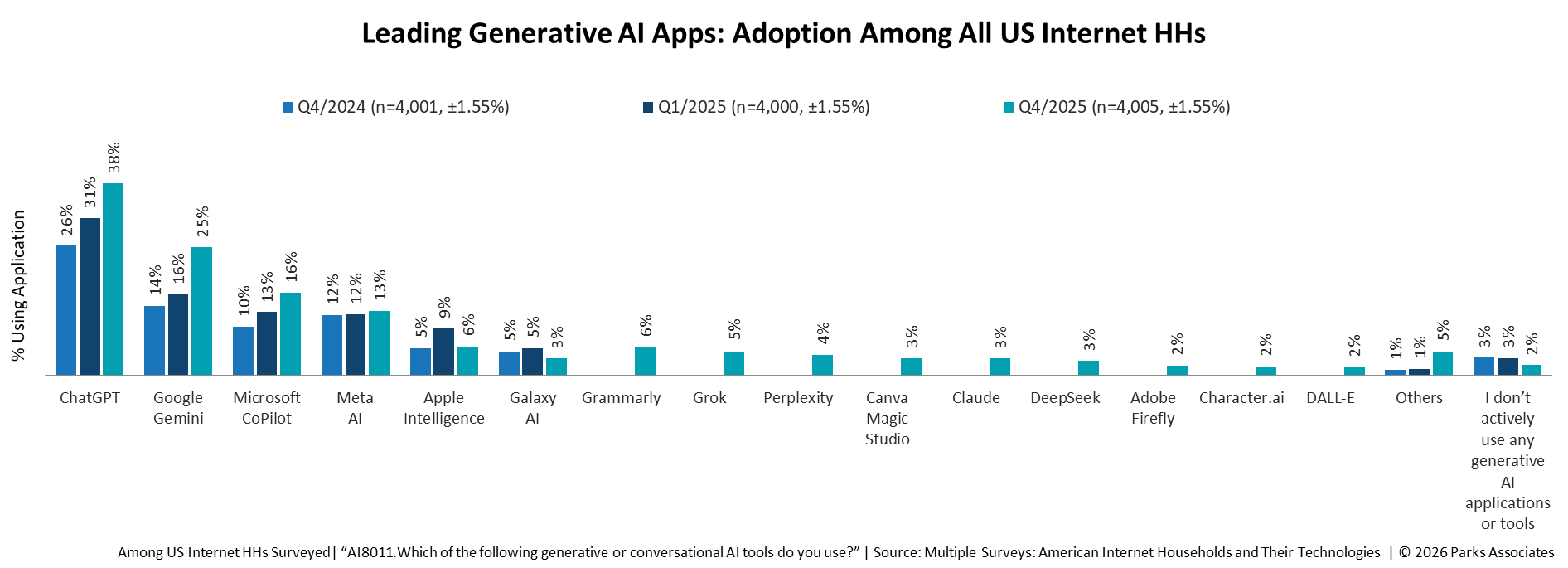
Despite its deficiencies, Copilot has been gaining adherents. “Use is growing,” said Jennifer Kent, senior vice president and a principal analyst at Parks Associates, a market research and consulting company specializing in consumer technology products in Dallas.
“Sixteen percent of consumers in U.S. internet households report using Copilot for personal, professional, or educational use in Q4 2025, up from just 10% the year prior,” she told TechNewsWorld.
However, Kent pointed out, “The user experience is not yet delighting consumers, as is the case with generative AI tools generally.”
She added that Copilot users gave the tool a minus-1 Net Promoter Score (NPS), which is on par with the average but far from the ideal user experience.
“Copilot hasn’t been able to address the needs folks have,” Enderle said. “It’s a down-level ChatGPT, and folks don’t like ChatGPT that much anymore. They’re mostly using Anthropic or Gemini.”
“So, the end result is that Microsoft has found itself out of position with regard to an AI wave that they helped create,” he continued. “That’s kind of why they’re rethinking the platform.”
“While the risk that they will lose their market position is still fairly low,” he added. “I think they recognize it’s growing, and that means they’ve got to update their products. They don’t want the same thing to happen to them with Windows that happened to them with Internet Explorer.”
File Explorer Performance a Pain Point
At times, Windows faces performance scalability issues, noted Yaz Palanichamy, a senior advisory analyst with the Info-Tech Research Group, a global research and advisory firm.
“A quick example would be when interacting with the File Explorer module, depending on how many apps or services you have running in the background, there are sometimes subtle, yet noticeable, delays in how the File Explorer app retrieves certain information from your desktop,” he told TechNewsWorld.
“A critical reason why Windows needs a performance update would be to strengthen its overall navigability and response time posture when interacting with specific file management applications or other core Windows ecosystem apps,” he said.
As part of the first round of improvements to Windows 11, Microsoft will focus on File Explorer, giving it a quicker launch experience, reduced flicker, smoother navigation, and more reliable performance for everyday file tasks, Davuluri noted.
“The bottom line is not that Microsoft wants to make Windows more exciting,” Vena said. “It is that Microsoft has realized Windows needs to become less annoying.”
“If the company truly delivers faster core experiences, lower memory overhead, calmer updates, and more disciplined AI integration, that will do more for Windows loyalty than another year of flashy features ever could,” he added. “It has quite a task on its hands.”